Automatic power-down
JP150PCB 1.3PCB 1.4since 26.8.0Jan PřibyslavskýThis page does not apply to the product or PCB revision chosen in the header.
The module can watch its selected input for silence and drop to a lower power level after a configurable period, returning to normal when audio comes back. The feature is disabled by default.
Settings
| Setting | Range | Default |
|---|---|---|
| Enable | on, off | off |
| Target level | any level except NORMAL |
PWRSTAGE_OFF |
| Delay | 10 to 65535 s (about 18 h) | 1800 s (30 min) |
| Silence threshold | raw level-meter units | 5 |
Silence is measured at the source, ahead of the volume control. A muted power stage that is still fed audio does not power down; paused audio counts as silence, so a paused source eventually powers the module down. The default threshold treats only near-digital silence as silent; a source with a residual DC offset or dither may never let the module power down, in which case raise the threshold.
In MuraLink
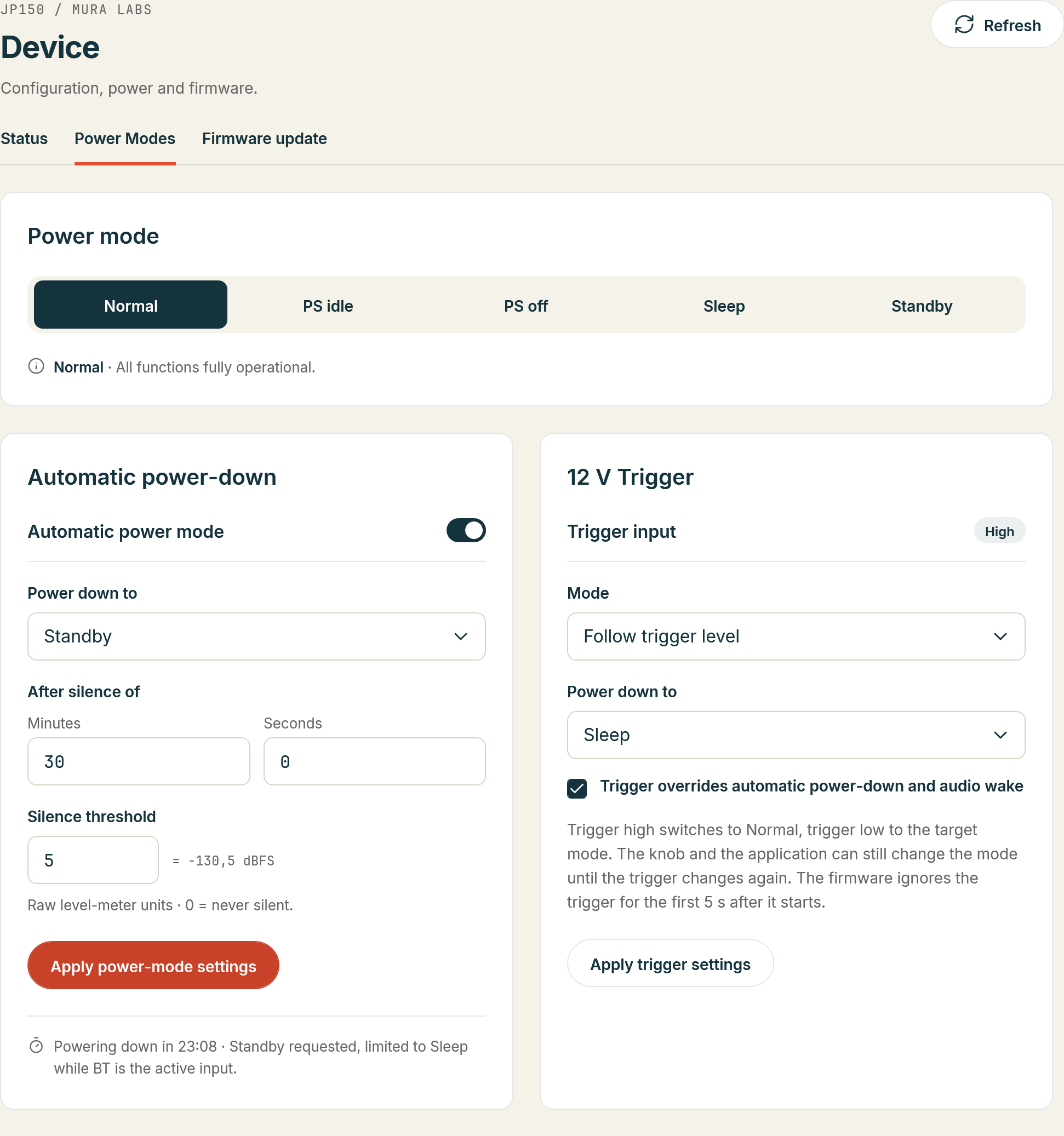
Device > Power Modes, section Automatic power-down: the Automatic power mode switch enables or disables the feature and applies at once. Power down to chooses the target level, After silence of the delay in minutes and seconds, and Silence threshold the level below which the input counts as silent (0 would never be silent); Apply power-mode settings sends the three values to the module. While the timer runs, the page shows the countdown.
Over the control interface
| Setting | Commands |
|---|---|
| Enable | SYS:POWER:AUTO?, SYS:POWER:AUTO with 0 or 1 |
| Target level | SYS:POWER:AUTO:MODE?, SYS:POWER:AUTO:MODE with the level |
| Delay | SYS:POWER:AUTO:DELAY?, SYS:POWER:AUTO:DELAY with the seconds |
| Silence threshold | SYS:POWER:AUTO:THRESHOLD?, SYS:POWER:AUTO:THRESHOLD with the raw value |
SYS:POWER:AUTO:STATE? returns the enable state, whether the timer runs, the configured and the
effective target, the delay and the elapsed and remaining seconds, so a host can show a countdown.
The syntax and the answers are in the SYS:POWER reference.
Wake sources
The module returns to normal operation on an encoder turn or press, on audio returning on the selected input, on a SigmaStudio programmer appearing on the DSP bus, and on any reset. The encoder action that wakes the module only wakes it: it does not also change the volume or the input, which you cannot see while powered down. On PCB 1.4 the 12 V trigger can wake the module as well.
Target level clamping by input
The module limits itself to a level it can reliably wake from, which depends on the selected input.
| Selected input | Deepest level entered | Reason |
|---|---|---|
| USB | STANDBY |
Incoming USB audio is detected by the host MCU directly. |
| Bluetooth | STANDBY |
The Bluetooth module reports the playback state. |
| Wi-Fi | SLEEP |
STANDBY would remove power from the Wi-Fi module. |
| S/PDIF, I2S | PWRSTAGE_OFF |
Only the DSP sees these signals, so it must keep running. |
| Sine generator | never powers down | The internal generator is never silent. |
A configured target deeper than the clamp is silently reduced; both the configured and the effective target are readable. USB caveat: powered down, the module sees USB packets arriving but not their content, so a computer that streams digital silence rather than stopping its stream reads as active and wakes the module about once per delay. Select another input, or leave automatic power-down off, with such a host.
Automatic power-down is suspended while a SigmaStudio programmer is active, and, with the trigger priority set, while the 12 V trigger holds the module awake.