Boot memory with MuraLink
JP150PCB 1.4since 26.10.1Jan PřibyslavskýThis page does not apply to the product or PCB revision chosen in the header.
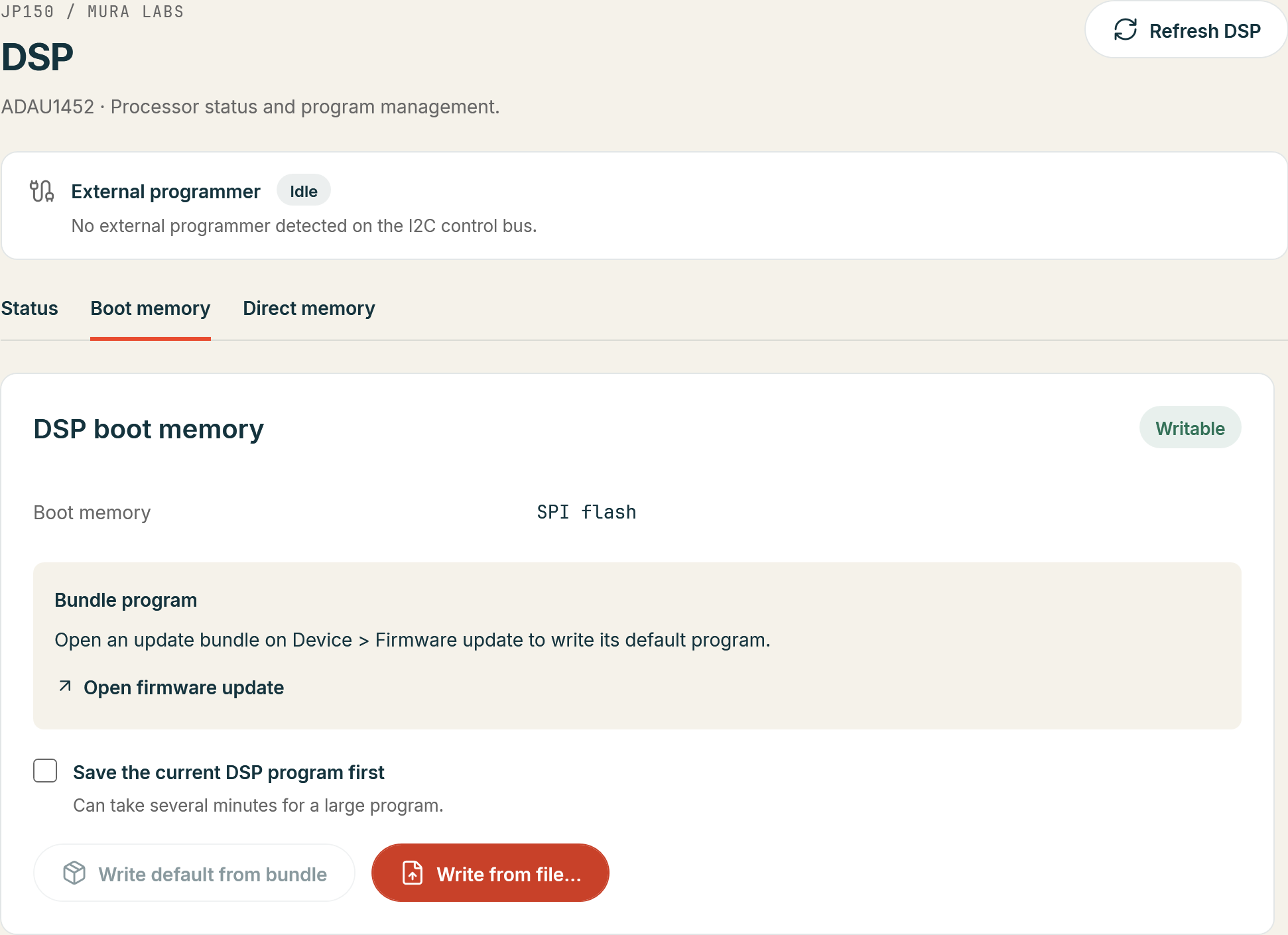
On PCB 1.4 the DSP boot memory is an SPI flash the module itself can write, and MuraLink's page
DSP > Boot memory does it without SigmaStudio and without the USBi: from the update bundle, which
carries the default DSP program, or from your own SigmaStudio self-boot export (E2Prom.Hex). PCB
1.3 modules are programmed through SigmaStudio instead (Writing the boot memory);
their page reads Not available on this board.
The page
- A badge with the availability: Writable, Not available (PCB 1.3), Not supported (firmware
before 26.10.1) or
n/a; and the memory type, SPI flash. - The default program of the opened update bundle for the connected board, with its name, size and the bundle file, or the hint to open a bundle on Device > Firmware update.
- The check box Save the current DSP program first, off by default: the write then reads the
current program into an
E2Prom.Hexfile you name before it erases anything. Saving a large program takes several minutes. When the flash holds no valid image, nothing is saved and the page says so. - The actions Write default from bundle and Write from file..., and during a write the phase and the progress in their place.
Before a write
- Detach the USBi. While a programmer holds the DSP bus the module does not stay in the power level the write needs, and MuraLink refuses the write.
- Keep the DSP self boot on (
DSP:SELFBOOT?answers1,1), or the DSP will not load the new program at its next start; MuraLink warns about it. - An own export is checked before anything is written: the
0xNNvalues of the file, the0xAAsentinel, the block chain, the footer checksum and the size against the 4 MB flash. A failing file is refused with the check named. - MuraLink sets the boot read clock of an own export to about 5 MHz and recomputes the footer checksum, and shows the old and the new speed word. SigmaStudio writes another form of the word with the settings of an I2C boot memory, with which the PCB 1.4 boot takes about 3 s instead of 50 ms. The file on disk is not changed. The bundle's image is written as it is.
- The confirmation names the file, its size and number of blocks and the speed change, and states that the current DSP program is replaced and that the audio stops during the write.
The write
MuraLink notes the module's power level, takes it to SLEEP (the DSP in reset frees the flash
for the module), and runs the phases Preparing, Saving the current program (if chosen),
Erasing, Writing, Verifying and Restarting the DSP with a progress bar. A piece that draws
no answer or fails its CRC check is sent again, up to three times; if a knob turn, returning
audio, the trigger or a USBi takes the module out of SLEEP, MuraLink sets SLEEP again and
repeats the step. The navigation, the device actions and Connect/Disconnect are locked for the
duration, and the log records the image source and its SHA-256, every step and the result.
The write succeeds when the CRC-32 of the written range matches the image. MuraLink restores the
previous power level; when that restarts the DSP it waits up to 10 s for DSP:BOOT? to report
READY and shows the boot time. Written and verified, but the DSP did not start the program
means the image or the self-boot setting is wrong, not the write. From SLEEP or STANDBY, or
with self boot off, the DSP loads the program at its next start.
A failed write is reported with the step and the module's answer, with the warning that the boot memory may now hold an incomplete program: the DSP does not start and there is no audio until a write succeeds, while the module stays usable and can be written again. MuraLink offers to repeat the write and restores the power level in every case.
During a firmware update
When the update bundle carries a DSP image for the connected board, the firmware update asks, before anything is sent, whether to write the default DSP program too. The question shows the image's title, description and changes, and says that the default program replaces whatever the module runs now, an own program included, and that a newer default may contain features an older one did not have. Choose Write the default DSP program or Keep the current DSP program; nothing is preselected, and the choice applies to this update only (Update with MuraLink).
The module keeps no record of which program its boot memory holds (known issue KI-09), so keep your exports with your project, and use Save the current DSP program first when in doubt.